
Free • Fast • Ultra HD 4K
Pinterest Video Downloader
Download Pinterest videos, images, and GIFs in original high definition (1080p, 2K, 4K) with no watermark — 100% free and secure.
Public Pins Supported
HD & 4K Available
No Watermark
No Login Required
Fetching Pinterest media... Please wait a moment.
- HD · 2K · 4K quality
- No watermark
- MP4, JPG, PNG, GIF supported
- Works on phone, tablet, and computer
How to Download a Pinterest Video
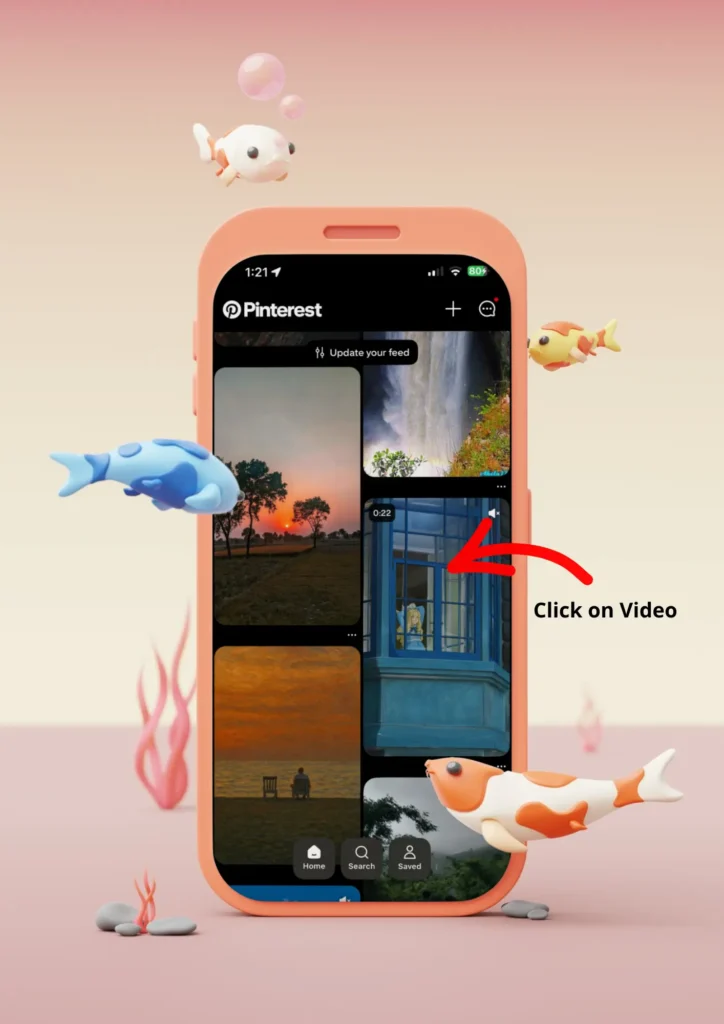
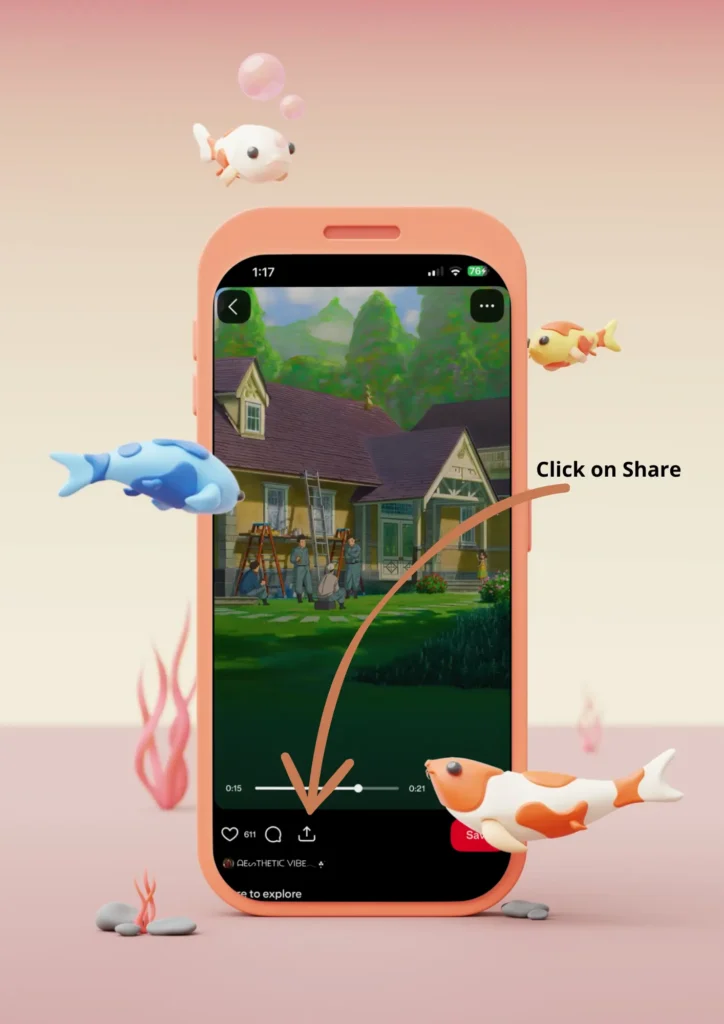
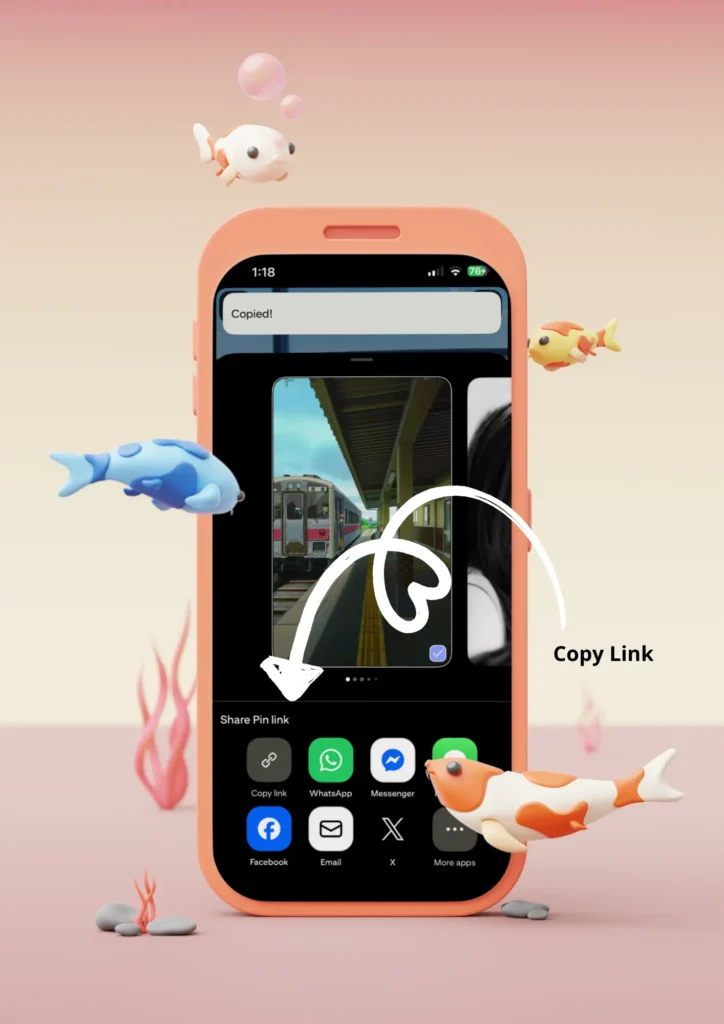
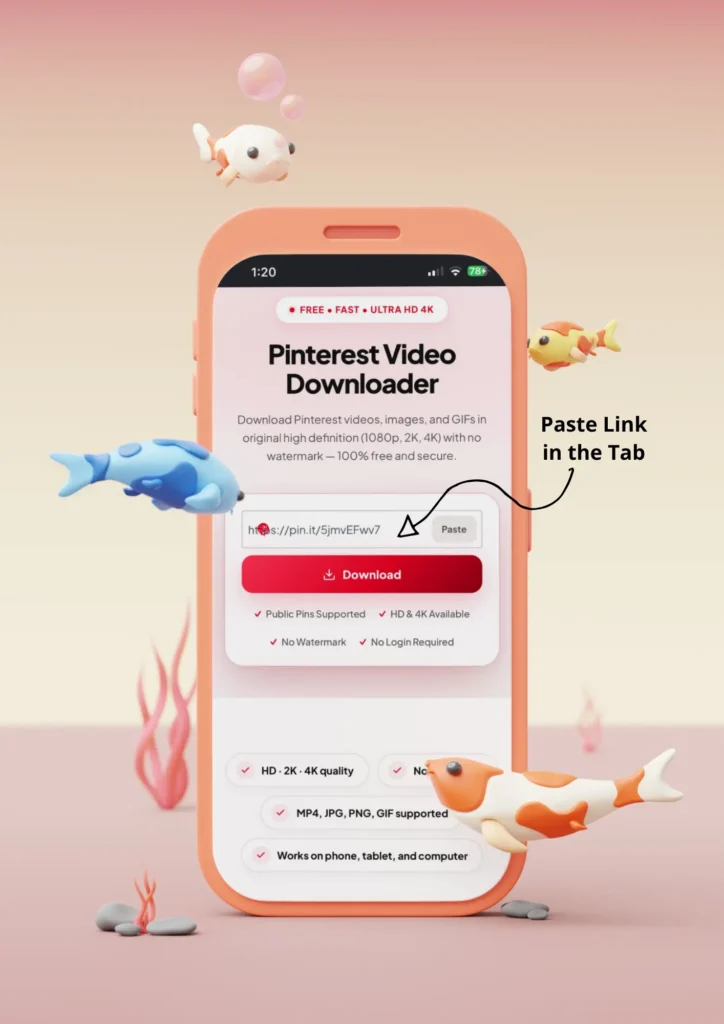
A Pinterest video downloader works in three steps. Open Pinterest and find the video you want. Tap the share icon and choose “Copy Link.” Paste the link above and tap Download.
Open Pinterest
Open Pinterest and find the video you want.
Copy Link
Tap the share icon and choose “Copy Link.”
Paste & Download
Paste the link above and tap Download.
Your video saves straight to your device. No app, no sign up.
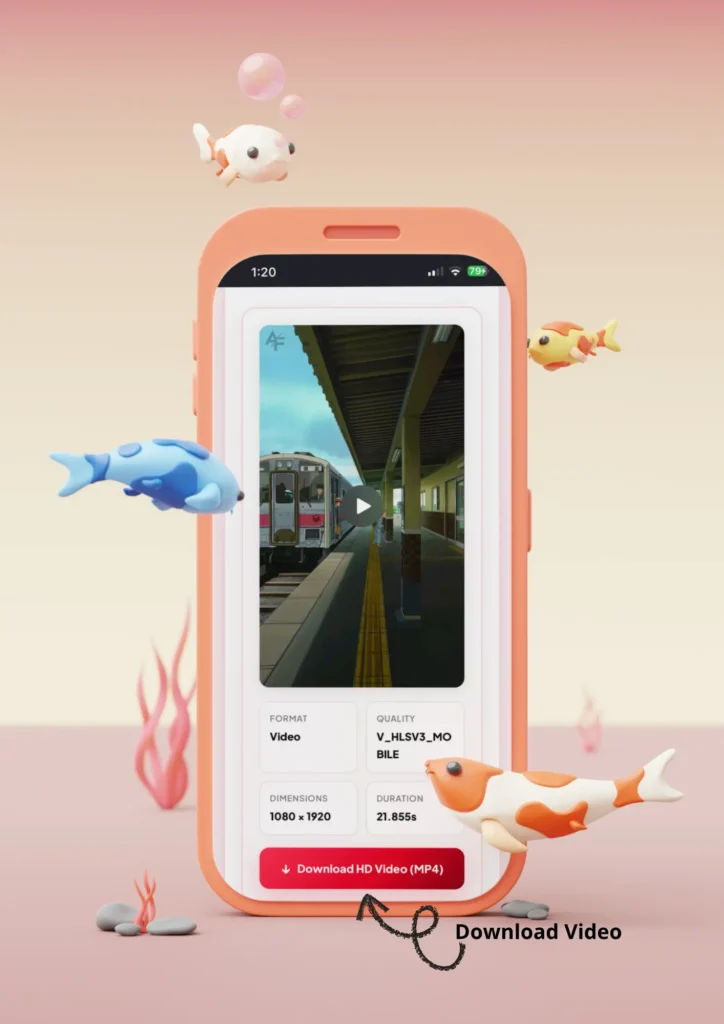
Downloading From the Pinterest App
You can download Pinterest videos straight from the Pinterest app without leaving it open. Copy the link, come back here, and paste it.
- Open the Pinterest app and find your pin.
- Tap the three dots (•••) on the pin.
- Tap Copy Link.
- Come back here, paste the link, and tap Download.
- Your file saves to your Photos or Downloads folder.
Downloading on a Computer
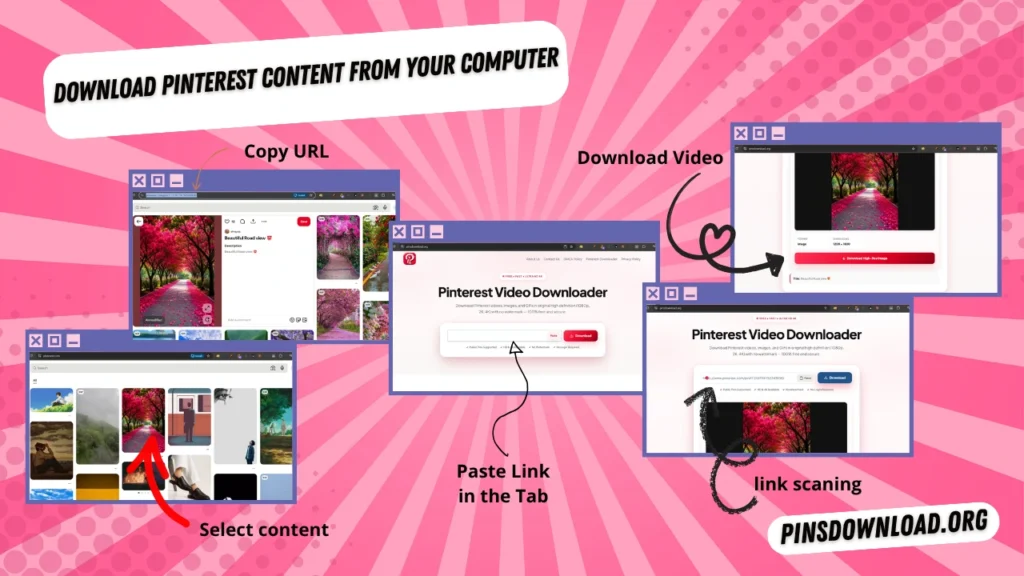
You can also download Pinterest videos on a computer, using any browser.
- Open Pinterest.com in your browser.
- Click the pin, then copy the link from your address bar.
- Paste it above and click Download.
- The file lands in your computer’s Downloads folder.
How to Download Pinterest Videos on iPhone
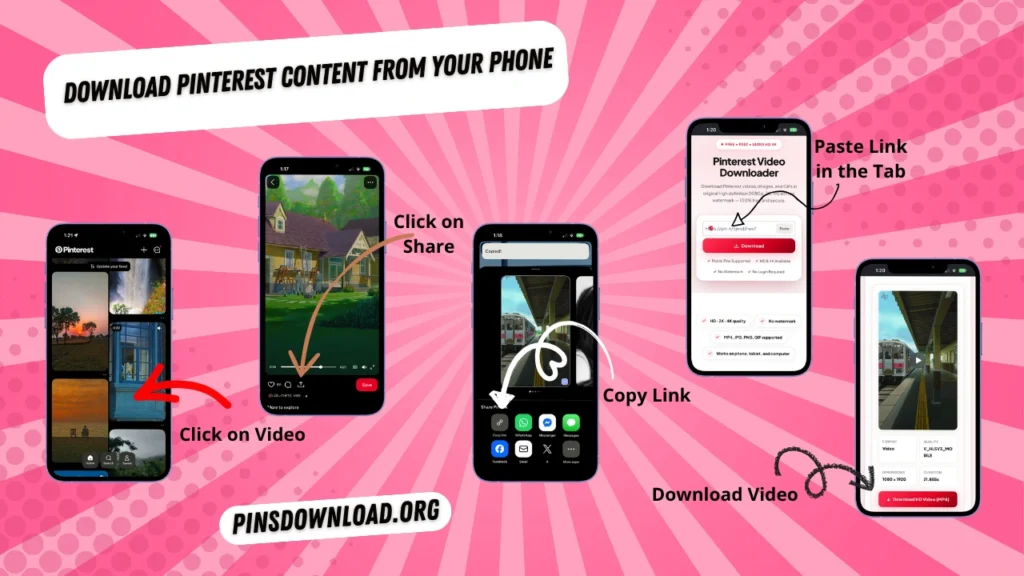
Yes, PinsDownload works on iPhone. You don’t need an app, just Safari and a Pinterest link.
- Open the Pinterest app on your iPhone.
- Tap the share icon on the video, then Copy Link.
- Open Safari and go to pinsdownload.org.
- Paste the link and tap Download.
- Save the video to your Photos app when it finishes.
How to Download Pinterest Videos on Android
Yes, PinsDownload works on Android too, right inside Chrome.
- Open the Pinterest app and find your video.
- Tap Share, then Copy Link.
- Open Chrome and visit pinsdownload.org.
- Paste the link and tap Download.
- The video saves to your Gallery or Downloads folder.
What This Tool Can and Can’t Download
PinsDownload works with any public Pinterest link. It can’t open anything that needs a Pinterest login.
What Works
- Public pins and pin.it links
- Videos, images, GIFs, stories, carousels
- Public boards and profiles
- Idea Pins and Ideas pages
What Doesn’t Work
- Private or login-only pins
- Deleted or removed pins
- Invitation-only boards
- Content you don’t have rights to save
Why People Use This Tool
PinsDownload is built to be simple, honest, and free. Here’s what that means in practice.
Free, always.
No hidden charges, no daily limit.
No watermark.
Your download looks exactly like the original.
No login.
We never ask for your Pinterest password.
Original quality.
Videos and images save in the same resolution Pinterest gives us.
Works everywhere.
Phone, tablet, or computer, any browser.
Honest about ads.
A small number of ads keep this tool free. They never sit on top of or look like the Download button.
What Else You Can Download From Pinterest
PinsDownload isn’t only for videos. It handles every kind of Pinterest content.
- Images and photos — save any pin in full resolution.
- GIFs — download animated pins without losing the loop.
- Reels and short videos — grab Pinterest’s short-form clips.
- Stories and Idea Pins — save every slide of a multi-page pin.
- Carousels — download every image or video in a multi-item pin.
- Boards — save up to 100 pins from a public board at once, or grab the whole thing as a ZIP file.
- Profiles — download every public pin from a Pinterest profile.
- Ideas pages — save content straight from a Pinterest Ideas collection.
- Answers pages — download pins shared on a Pinterest Answers page.
- Shared pin links — paste any multi-pin share link and download everything in it.
What Is a Pinterest Video Downloader?
A Pinterest video downloader is a free online tool that saves Pinterest videos, images, and GIFs to your device. Pinterest doesn’t let you download videos directly from its app or website, so this tool reads the pin’s link and gives you a direct file to save. You don’t need an account, and nothing is stored on our end after your download finishes.
What People Use It For
People download Pinterest content for all kinds of projects. Here are the most common ones.
- Home décor — interior designs, room layouts & inspiration.
- Recipes — food photography, cooking tips & meal plans.
- Fashion inspiration — outfit ideas, styles & lookbooks.
- DIY & craft projects — step-by-step tutorials & creative ideas.
- Wedding planning — dresses, decor themes & venues.
- Travel photos — itinerary ideas & dream destination guides.
- Fitness routines — workout clips, healthy tips & form guides.
- Study notes & aesthetics — summaries & revision material.
- Art references — character designs, color palettes & sketches.
- Mood boards — creative concepts & vision boards.
How This Compares to Other Downloaders
PinsDownload is built to beat the basics that most Pinterest downloaders get wrong.
| PinsDownload | Typical Free Downloaders | Downloader Apps | |
|---|---|---|---|
| Quality | Up to 4K | Often capped at 720p | Sometimes compressed |
| Watermark | None | Usually none | Often adds app logo |
| Login needed | No | No | Often yes |
| Speed | Seconds | Slow, ad-heavy | Medium |
| Bulk/ZIP download | Yes, up to 100 pins | Rare | Rare |
| Privacy | Nothing stored | Varies | Often collects data |
Every row in the PinsDownload column is tested and supported.
Works on Every Device
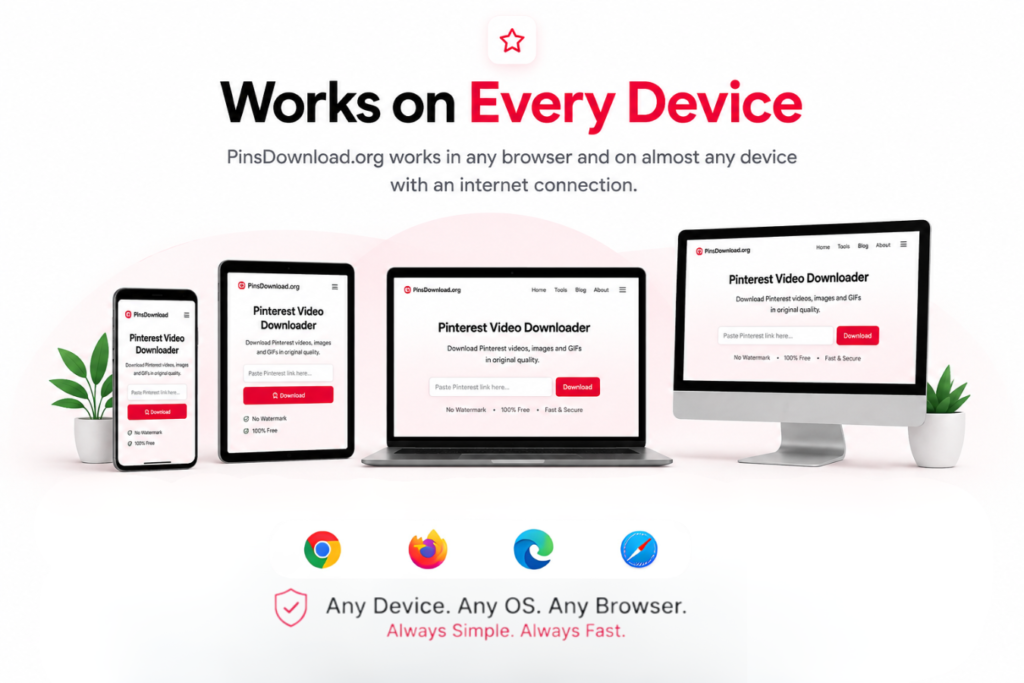
PinsDownload runs in a browser, so it works on almost anything with an internet connection.
- Android — Chrome, Firefox
- iPhone / iPad — Safari, Chrome
- Windows — Chrome, Edge
- Mac — Safari, Chrome
- Linux — Firefox, Chrome
Is This Safe to Use?
Yes. We never ask for your Pinterest username or password. You paste a public link, we fetch the file, and nothing you download is stored on our servers afterward. We use standard analytics to see which pages are useful, the same as most websites, but your download history stays completely private.
Check Our Current Reputation
- Google Safe Browsing — Verified Clean Status
- Norton Safe Web — Threat-Free Evaluation
- Sucuri Scanner — Verified Secure Security Report
Is It Legal to Download Pinterest Videos?
Downloading a Pinterest video for personal, offline use is generally fine. Reposting, selling, or reusing someone else’s video without permission is not. Pinterest content belongs to the person who posted it, so always ask before using it publicly.
What Users Say
★★★★★
Good tool
“Barely any ads, and it saved my pins in seconds. Exactly what I was looking for.”
★★★★★
Simple and fast
“Just paste the link and it works. No sign up, no confusing steps.”
★★★★☆
Does what it says
“Downloaded a whole board for a mood board project, saved me a lot of time.”
What’s New
Aug 2026 — Launched: PinsDownload is live, with video, image, GIF, story, carousel, board, and profile downloads all working from day one.
Guides & Tips
- Board Guide — How to Download a Full Pinterest Board in 1 Click
- Legal Guide — Is Downloading Pinterest Content Legal for Personal Use?
- Comparison — PinsDownload vs Other Online Downloader Tools
Frequently Asked Questions
Is PinsDownload safe to use?
Yes. We never ask for your Pinterest login, and we don’t store the files you download.
Is it legal to download Pinterest videos?
Downloading for personal use is fine. Reposting someone else’s work without permission is not.
Do I need to log in to my Pinterest account?
No. PinsDownload only works with public links, so no login is needed.
What video and image formats are supported?
Videos save as MP4. Images save as JPG or PNG. GIFs keep their original animation.
Does this tool save my downloaded content?
No. We fetch the file and send it straight to you. Nothing is kept on our servers.
Can I download Pinterest videos without a watermark?
Yes. Every download matches the original Pinterest file, with no watermark added.
Is there a limit on how many videos I can download?
No daily limit for single pins. Board and profile downloads are capped at 100 pins per request.
Does this work on iPhone and Android?
Yes. PinsDownload runs in your browser, so it works on iPhone, Android, and desktop.
Can I download a full Pinterest board or profile?
Yes. Paste the board or profile link, then choose to download items one by one or all at once as a ZIP.
Can I download private or deleted pins?
No. PinsDownload only works with public, active pins.
What should I do if a download fails?
Check that the link is public and still active. If it still fails, try copying the link again from Pinterest.
Will the video lose quality after downloading?
No. PinsDownload saves the file at the same resolution Pinterest provides, with no extra compression.
Quick Answers
- Can I download Pinterest GIFs? — Yes, paste the GIF’s link the same way as a video.
- Where do my downloads go? — Your device’s default Downloads folder or Photos app.
- Does this cost anything? — No, it’s 100% free with no limits on single downloads.
- Is this the same as a “pin saver”? — Yes, PinsDownload works as a Pinterest saver for all media types.
Other Tools
- Pinterest Video Downloader (Active)
- Pinterest Image Downloader Full-resolution photo saves
- Pinterest GIF Downloader Native GIF format, no re-encoding
- Pinterest Story Downloader Every slide of a Story or Idea Pin
- Pinterest Reel Downloader Short vertical clips with sound
- Pinterest Shared Pins Downloader Every pin from a multi-pin share link
- Pinterest Profile Downloader Every public pin from a profile
- Pinterest Ideas Page Downloader Pins from a Pinterest topic page
- Pinterest Carousel Downloader Every item in a multi-photo pin
- Pinterest Board Downloader Bulk download full boards as ZIP
- Pinterest Answers Page Downloader Pins from a Pinterest Q&A page
- Supported Pinterest Links Check your link format & troubleshoot