
JPG • PNG • Full Resolution • No Watermark
Pinterest Image Downloader
Save any Pinterest photo, graphic, or infographic in its original size. Free, no watermark, no account needed — full resolution direct download.
Public Pins Supported
HD & 4K Available
No Watermark
No Login Required
Fetching Pinterest media... Please wait a moment.
Pinterest Image Downloader is the fastest way to save a Pinterest photo as a real file on your device. Paste a pin link, get the original image back at full resolution, no cropping and no compression.
- JPG · PNG format
- Original full resolution
- No watermark
- No cropping or compression
- Works on phone, tablet & computer
How to Download a Pinterest Image
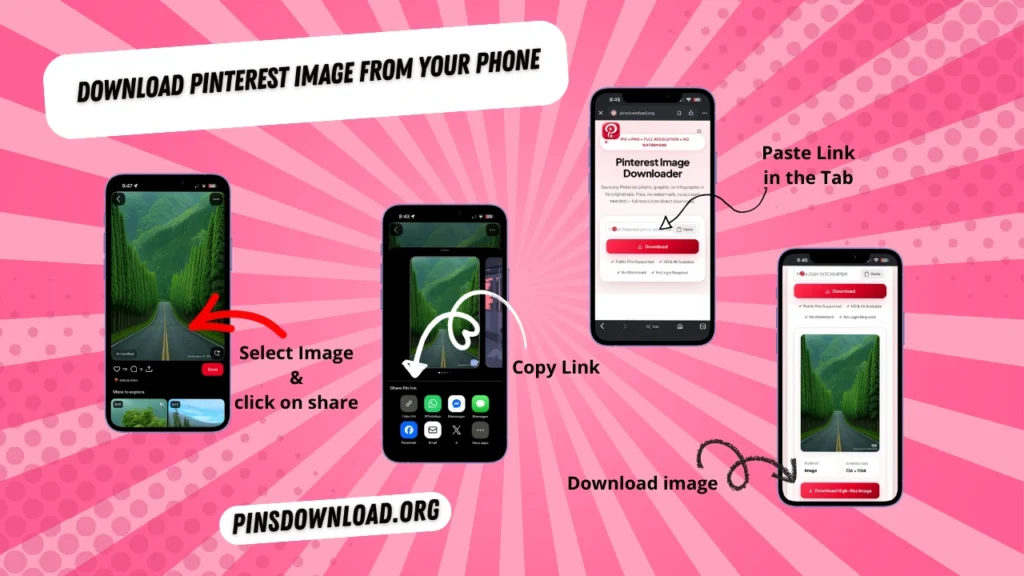
Saving a Pinterest image takes three steps, and none of them need an app.
Open Pinterest
Open Pinterest and find the image, photo, or graphic you want to save.
Copy Link
Tap the share icon or three dots on the pin and choose “Copy Link.”
Paste & Download
Paste the link in the downloader box above and tap the Download button.
The photo saves at full size, exactly as the pin creator uploaded it.
Why Pinterest Doesn’t Let You Save Images Directly
Pinterest’s own save button only pins an image to your board inside Pinterest. It doesn’t give you a file on your device. That’s the gap this page fills. PinsDownload reads the pin’s link, finds the actual image file behind it, and hands you a direct download instead of another pin on another board.
What This Tool Can and Can’t Download
PinsDownload works with any public Pinterest image link. Private boards and login-only pins are the only things it can’t reach.
What Works
- Public image pins and pin.it links
- Photos, graphics, infographics, screenshots
- Public boards full of images
- Images inside Idea Pins
What Doesn’t Work
- Private or login-only pins
- Deleted or removed pins
- Invitation-only boards
- Content you don’t have rights to save
Why This Image Downloader Is Different
Most Pinterest downloaders compress the image on the way out, or crop it to fit a preview box. PinsDownload doesn’t touch the file. What you download is the same file Pinterest itself is serving, pixel for pixel. A small number of ads keep the tool free, but they’re kept away from the Download button so you never tap the wrong thing by mistake.
What Else You Can Download From Pinterest
Pinterest Image Downloader isn’t limited to photos. Photos are only one piece of what’s on Pinterest. PinsDownload covers the rest too.
- Videos Save Pinterest videos in HD, up to 4K when the source has it.
- GIFs Download animated pins without losing the loop.
- Reels & short clips Grab Pinterest’s short-form video clips.
- Stories & Idea Pins Save every slide of a multi-page pin.
- Carousels Download every image or video in a multi-item pin.
- Boards Save an entire board of images at once, or download it as a ZIP file.
- Profiles Download every public image from a Pinterest profile.
What Is a Pinterest Image Downloader?
A Pinterest image downloader is a free tool that saves a Pinterest photo to your device as an actual file, instead of just pinning it to another board. Pinterest’s website and app only let you re-pin or share an image, not download it directly, so a tool like this reads the pin’s link and gives you the real file. No account is needed, and the image isn’t stored anywhere after your download finishes.
What People Save Images For
People download Pinterest photos, graphics, and art references for all kinds of creative projects.
- Home décor Interior designs, room layouts & architecture.
- Recipe cards Cooking inspiration, food photography & menus.
- Outfit & style Fashion references, aesthetic clothes & lookbooks.
- Craft & DIY Handmade projects, step guides & creative crafts.
- Wedding mood boards Dresses, flowers, themes & invitations.
- Travel photos Dream destinations, packing lists & scenery.
- Study notes Revision infographics, summaries & mind maps.
- Art references Digital art, character drawings & color palettes.
Frequently Asked Questions
Can I download a Pinterest image without a watermark?
Yes. PinsDownload saves the exact file Pinterest serves, with nothing added or removed.
Will the image be full size, or a small preview?
Full size. PinsDownload fetches the original file, not the thumbnail version Pinterest shows on the board.
Do I need a Pinterest account to download images?
No. Paste a public pin link and download, no login required.
Can I download every image from a board at once?
Yes. Paste the board link, then choose to download images one by one or all together as a ZIP.
What image formats does this support?
Most Pinterest images save as JPG or PNG, depending on how the original was uploaded.
Can I download images from a private board?
No. PinsDownload only works with public pins and boards.
Is this the same as downloading a Pinterest image directly?
Yes. When you download a Pinterest image here, you get the same file as if Pinterest let you save it directly, just without the extra step of re-pinning first.
Check Our Current Reputation
PinsDownload is verified clean, malware-free, and safe across major internet security databases.
- Google Safe Browsing Verified Clean & Safe Status
- Norton Safe Web Threat-Free Evaluation Report
- Sucuri Scanner Verified Security & Malware-Free
Other Tools
- Pinterest Video Downloader Save HD and 4K MP4 clips
- Pinterest Image Downloader (Active)
- Pinterest GIF Downloader Native GIF format, no re-encoding
- Pinterest Story Downloader Every slide of a Story or Idea Pin
- Pinterest Reel Downloader Short vertical clips with sound
- Pinterest Shared Pins Downloader Every pin from a multi-pin share link
- Pinterest Profile Downloader Every public pin from a profile
- Pinterest Ideas Page Downloader Pins from a Pinterest topic page
- Pinterest Carousel Downloader Every item in a multi-photo pin
- Pinterest Board Downloader Bulk download full boards as ZIP
- Pinterest Answers Page Downloader Pins from a Pinterest Q&A page
- Supported Pinterest Links Check your link format & troubleshoot