
PinsDownload Guide
How Does the Pinterest Downloader Work?
PinsDownload turns a public Pinterest link into a downloadable file in a few simple steps. No software installation is required, and you can use it from a phone, tablet, or computer.
Open Pinterest Downloader- 3-step process
- No app required
- Works on any device
- No login needed
How PinsDownload Works
Find the Pin, copy its public link, then paste the link into PinsDownload.
Find a Pinterest Pin
Open Pinterest and find the video, image, GIF, or other public Pin you want to save.
Copy the Pin Link
Use Pinterest’s Share option and choose Copy Link. You can also copy the public URL from your browser.
Paste and Download
Return to PinsDownload, paste the link into the downloader, and select Download when your result is ready.
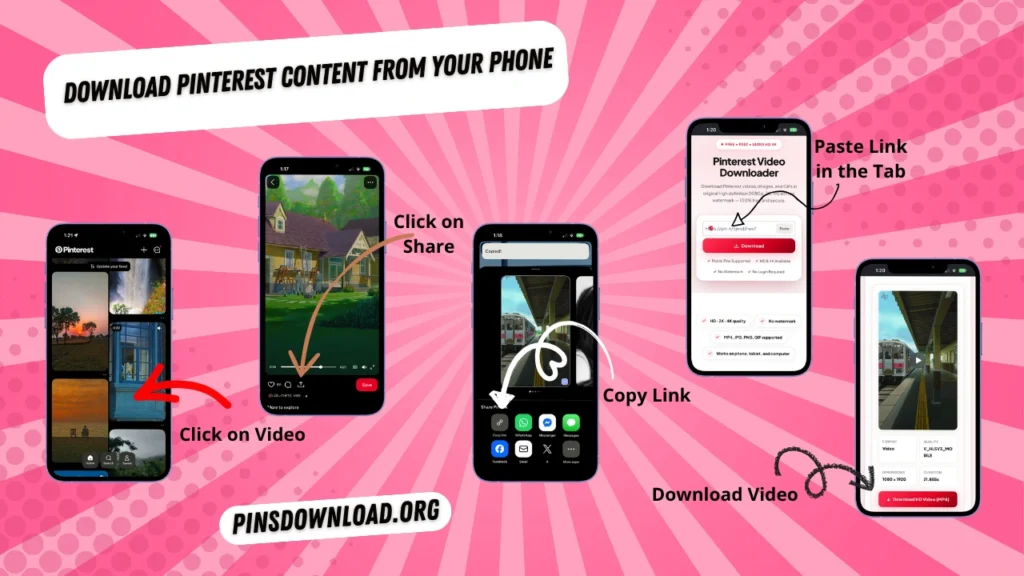
Download Pinterest Content From Your Phone
You do not need a separate downloader app. PinsDownload runs in your mobile browser, so the same basic process works on iPhone and Android.
- Open the Pinterest app and find the Pin.
- Tap Share and choose Copy Link.
- Open PinsDownload in Safari or Chrome.
- Paste the Pinterest link into the downloader.
- Tap Download and save the resulting file.
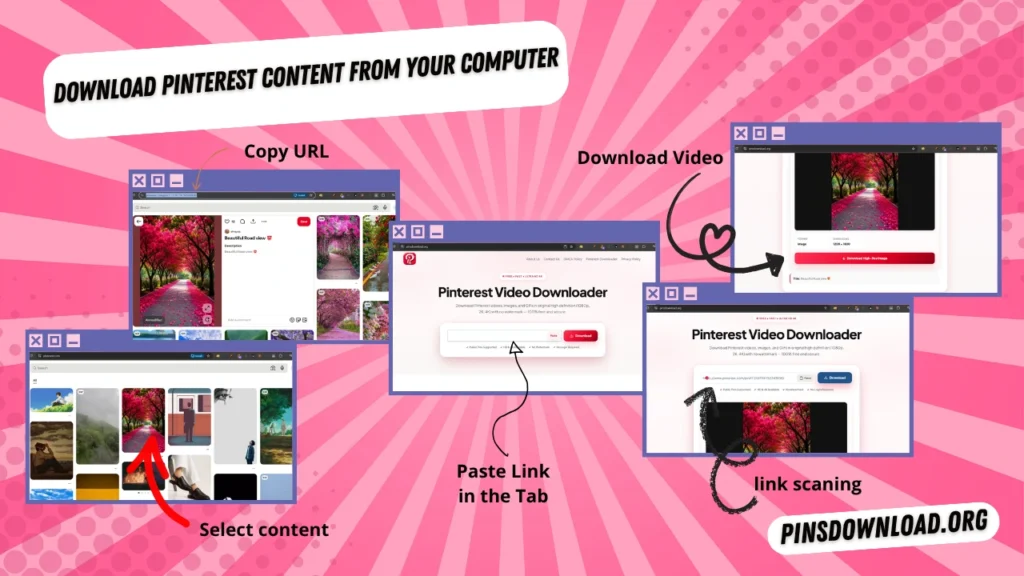
How to Use It on a Computer
The desktop process is just as quick. Open Pinterest in your browser, open the Pin, copy its URL, and return to PinsDownload.
- Open Pinterest in a modern browser.
- Open the Pin you want to download.
- Copy the Pin URL from the address bar or Share menu.
- Paste the link into PinsDownload.
- Download the available file.
What Can You Download?
PinsDownload supports public Pinterest content that the downloader can access from its link.
- Pinterest Videos Save public Pinterest video Pins as downloadable files.
- Images & Photos Save images from public Pins to your device.
- GIFs Download supported animated Pinterest GIF content.
- Stories & Idea Pins Save supported multi-page Pinterest content.
Important: Private, deleted, invitation-only, or login-required content cannot be downloaded. Only save content you have permission to use.
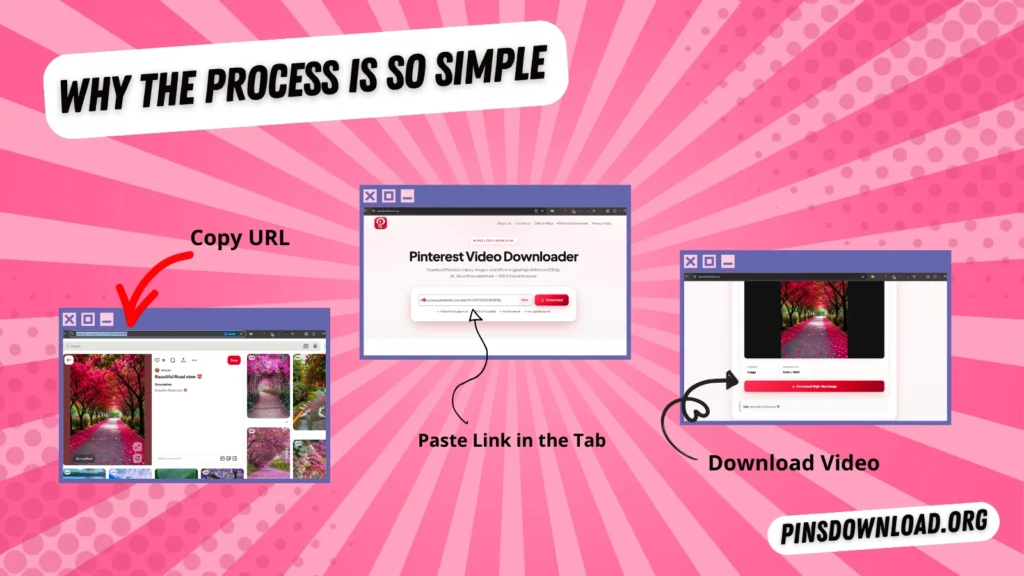
Why the Process Is So Simple
PinsDownload is built around the public Pin URL. Instead of asking you to install software or create an account, it uses the link you provide to locate supported media and prepare it for download.
This makes the tool useful when you want to save a Pinterest video or image quickly from a browser without adding another app to your device.
Common Problems and Quick Fixes
Why is my Pinterest link not working?
Make sure the Pin is public and still available. Copy the link again directly from Pinterest and paste the new URL into PinsDownload.
Can I download a private Pinterest Pin?
No. PinsDownload works with public content and cannot access private or login-only Pins.
Do I need a Pinterest account?
You do not need to give PinsDownload your Pinterest username or password. The downloader uses the public link you provide.
Where does my downloaded file go?
On a computer it normally appears in your browser’s Downloads folder. On a phone, the location depends on your browser and device settings.
Will PinsDownload work on iPhone and Android?
Yes. The tool runs in a web browser, so you can use it on supported iPhone, iPad, Android, Windows, Mac, and Linux devices.
Use Pinterest Content Responsibly
Pinterest content is created and posted by its owners. Downloading a file does not automatically give you permission to repost, sell, or use that content commercially.
Use PinsDownload for content you own, have permission to use, or are otherwise allowed to save. Respect copyright and the rights of the original creator.