
Pinterest Image Downloader is the fastest way to save a Pinterest photo as a real file on your device. Paste a pin link, get the original image back at full resolution, no cropping and no compression.
- JPG · PNG format
- Original full resolution
- No watermark
- No cropping or compression
- Works on phone, tablet & computer
How to Download a Pinterest Image
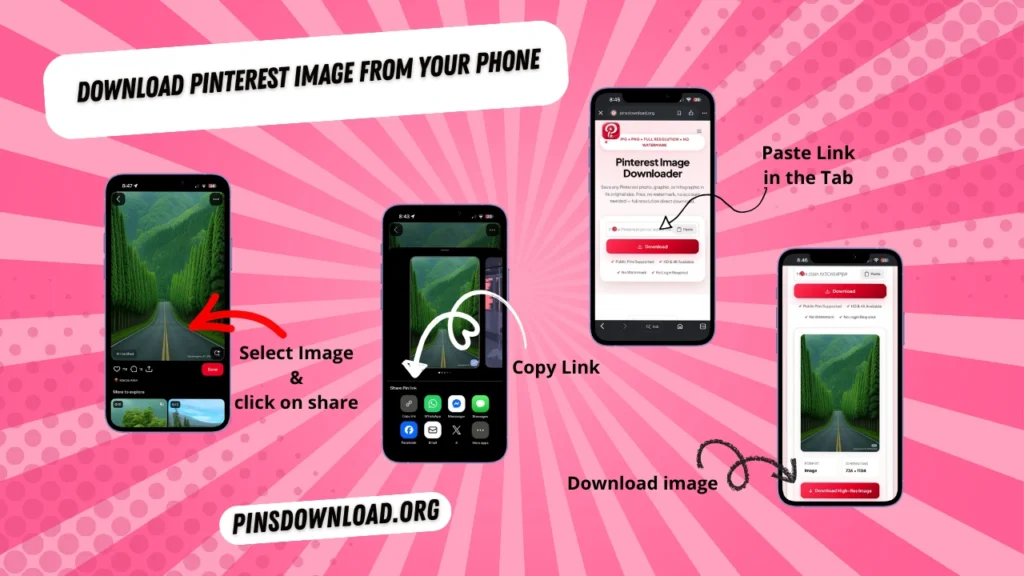
Saving a Pinterest image takes three steps, and none of them need an app.
Open Pinterest
Open Pinterest and find the image, photo, or graphic you want to save.
Copy Link
Tap the share icon or three dots on the pin and choose “Copy Link.”
Paste & Download
Paste the link in the downloader box above and tap the Download button.
The photo saves at full size, exactly as the pin creator uploaded it.
Why Pinterest Doesn’t Let You Save Images Directly
Pinterest’s own save button only pins an image to your board inside Pinterest. It doesn’t give you a file on your device. That’s the gap this page fills. PinsDownload reads the pin’s link, finds the actual image file behind it, and hands you a direct download instead of another pin on another board.
What This Tool Can and Can’t Download
Any public image pin works, including short pin.it links. If a pin hides behind a login, the tool cannot see it either.
What Works
- Public photo pins, graphics and infographics
- Short pin.it links and full pin links
- Tall images, screenshots and text heavy pins
- Images that sit inside Idea Pins
What Doesn’t Work
- Pins on private or invitation only boards
- Deleted pins
- Login only pins
- Pins you have no right to reuse
Why This Image Downloader Is Different
Many image tools shrink the file on the way out. Some crop it. Some compress it until the text on an infographic turns fuzzy. This tool changes nothing. The file you get is the file Pinterest serves, at the same size and the same sharpness, pixel for pixel. That matters most for infographics, recipe cards and study notes, where small text has to stay readable.
What Else You Can Download From Pinterest
Pinterest Image Downloader isn’t limited to photos. Photos are only one piece of what’s on Pinterest. PinsDownload covers the rest too.
- Videos Save Pinterest videos in HD, up to 4K when the source has it.
- GIFs Download animated pins without losing the loop.
- Reels & short clips Grab Pinterest’s short-form video clips.
- Stories & Idea Pins Save every slide of a multi-page pin.
- Carousels Download every image or video in a multi-item pin.
- Boards — Save an entire board of images at once, up to 50 pins.
- Profiles Download every public image from a Pinterest profile.
What Is a Pinterest Image Downloader?
It is a small free tool with one job. It turns a Pinterest image link into a real image file on your phone or computer. On Pinterest itself you can only re pin an image or share its link. You cannot save the actual file from most pins. This tool reads the link and fetches the full size file behind it. No account. No sign up. The image passes through and lands on your device only.
What People Save Images For
People download Pinterest photos, graphics, and art references for all kinds of creative projects.
- Home décor Interior designs, room layouts & architecture.
- Recipe cards Cooking inspiration, food photography & menus.
- Outfit & style Fashion references, aesthetic clothes & lookbooks.
- Craft & DIY Handmade projects, step guides & creative crafts.
- Wedding mood boards Dresses, flowers, themes & invitations.
- Travel photos Dream destinations, packing lists & scenery.
- Study notes Revision infographics, summaries & mind maps.
- Art references Digital art, character drawings & color palettes.
How to Check You Got the Full Size Image
Pinterest shows a small preview on the pin page. That preview fools many people. The real image file sits behind the pin at a much bigger size.
After you download, open the file and check its size. A full size image often runs past 1000 pixels on its long side. A preview copy stays small and looks soft on a big screen.
Zoom into one corner of the photo. A sharp corner means you hold the real file. A blurry corner means the save caught the preview. Run the pin link through the tool again and save the full file.
- Check the pixel size in the file details.
- Zoom in and look for sharp edges.
- Compare the file size with the preview.
- Save again if the file looks soft.
Frequently Asked Questions
Can I download a Pinterest image without a watermark?
Yes. PinsDownload saves the exact file Pinterest serves, with nothing added or removed.
Will the image be full size, or a small preview?
Full size. PinsDownload fetches the original file, not the thumbnail version Pinterest shows on the board.
Do I need a Pinterest account to download images?
No. Paste a public pin link and download, no login required.
Can I download every image from a board at once?
Yes. Paste the board link. The tool lists up to 50 pins. You save each image with its own download button.
What image formats does this support?
Most Pinterest images save as JPG or PNG, depending on how the original was uploaded.
Can I download images from a private board?
No. PinsDownload only works with public pins and boards.
Is this the same as downloading a Pinterest image directly?
Yes. When you download a Pinterest image here, you get the same file as if Pinterest let you save it directly, just without the extra step of re-pinning first.
Check Our Current Reputation
PinsDownload is verified clean, malware-free, and safe across major internet security databases.
- Google Safe Browsing Verified Clean & Safe Status
- Norton Safe Web Threat-Free Evaluation Report
- Sucuri Scanner Verified Security & Malware-Free
Other Tools
- Pinterest Video Downloader Save HD and 4K MP4 clips
- Pinterest Image Downloader (Active)
- Pinterest GIF Downloader Native GIF format, no re-encoding
- Pinterest Story Downloader Every slide of a Story or Idea Pin
- Pinterest Reel Downloader Short vertical clips with sound
- Pinterest Shared Pins Downloader Every pin from a multi-pin share link
- Pinterest Profile Downloader Every public pin from a profile
- Pinterest Ideas Page Downloader Pins from a Pinterest topic page
- Pinterest Carousel Downloader Every item in a multi-photo pin
- Pinterest Board Downloader Bulk download full boards, up to 50 pins
- Pinterest Answers Page Downloader Pins from a Pinterest Q&A page
- Supported Pinterest Links Check your link format & troubleshoot